I used to work with my laptop flat on my desk, hunched over like I was trying to read a menu in a dark restaurant. After about a year of remote work, my neck started aching by 2pm every single day. Turns out that’s not a coincidence. When your laptop screen sits at desk height, you’re tilting your head down for hours, and that posture puts a ridiculous amount of strain on your cervical spine. A laptop stand fixes this by raising your screen to eye level, and once you pair it with an external keyboard and mouse, your whole workstation starts to feel like something an actual ergonomist designed instead of something you cobbled together from a stack of books.
Quick verdict: If you just want something cheap and functional, get the Nulaxy Adjustable Laptop Stand. If you travel a lot and want something that folds flat, go with the Roost Laptop Stand V3. And if you want the best all-around stand for a permanent desk setup and don’t mind spending more, the Rain Design mStand or the Twelve South Curve are both worth it.
What to look for in a laptop stand
Before I get into specific picks, here’s what actually matters when you’re shopping for one of these.
Adjustability. Some stands are fixed at one angle and height, which works fine if you already know that height suits you. Others let you adjust the tilt and elevation, which is worth paying more for if you switch between sitting and standing, or if you share a desk with someone else.
Portability. If you work from coffee shops or fly for work, weight and fold-flat design matter a lot. A stand that weighs a pound and collapses to a few inches thick is a completely different product from a solid aluminum riser that lives on one desk permanently.
Material and stability. Aluminum stands feel sturdier and dissipate heat better, which matters if your laptop runs hot. Plastic stands are lighter and cheaper but can wobble, especially with heavier 16-inch laptops. Check the weight capacity before you buy, not after your MacBook Pro takes a dive.
Compatibility with laptop sizes. Most stands claim to fit “10 to 17 inches,” but the actual grip width and base footprint vary. If you own a 16-inch MacBook Pro or a bulky gaming laptop, double check the max width listed by the manufacturer instead of assuming it’ll fit.
With that out of the way, here are the five stands I’d actually recommend, starting with the cheapest.
1. Nulaxy Ergonomic Adjustable Laptop Stand
Price: $15.99 — Check price on Amazon
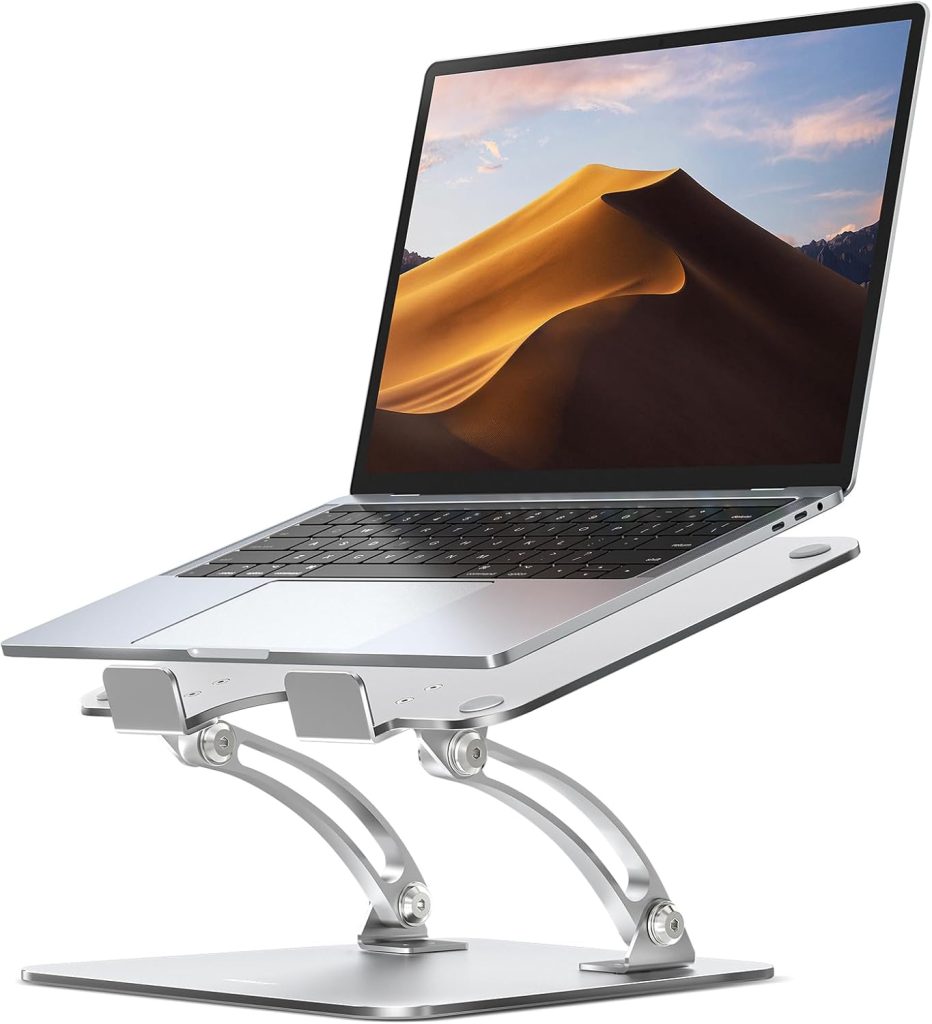
This is the stand I recommend to anyone asking “what’s the cheapest thing that actually works.” The Nulaxy is an aluminum riser with a folding design that adjusts across six height settings, from about 2 inches to 8 inches. It fits laptops from 10 to 17 inches, and the base has a decent amount of ventilation cut into it, so your laptop isn’t just sitting on a slab of metal with nowhere for the heat to go.
I’ve used one of these at a secondary desk for over a year and it’s held up fine. It’s not fancy. The hinges feel like hinges, not like the buttery smooth adjustment you get on something twice the price. But for the money, it does the one job it needs to do, which is get your screen up to eye level so you stop hunching.
The main complaint I have is that it’s not the most stable thing if you’re an aggressive typer or you bump the desk a lot. It’s fine for a stationary setup where you’re using an external keyboard, less fine if you’re typing directly on the laptop while it’s propped up on this thing.
Pros:
– Very affordable for what you get
– Folds flat for storage or travel
– Good ventilation, laptop doesn’t overheat
– Six adjustable height settings
Cons:
– Can feel a little wobbly with heavier laptops
– Not as smooth to adjust as pricier options
– Aluminum finish scuffs over time
Best for: people who want a functional, no-frills stand for a second desk or a first-time setup without spending much.
2. Lamicall Adjustable Laptop Stand
Price: $32.99 — Check price on Amazon
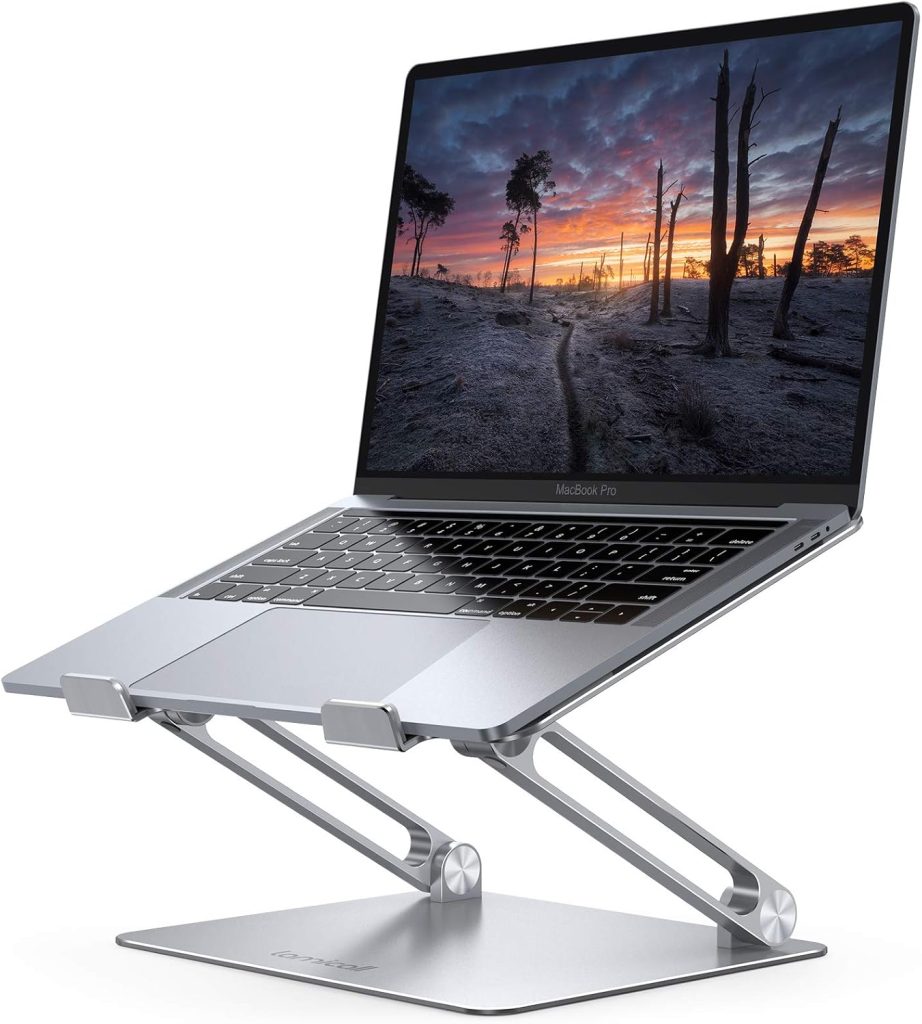
The Lamicall sits right above the Nulaxy in price but feels like a step up in build quality. It’s also aluminum, but the adjustment mechanism uses a ratchet-style hinge that locks into a wider range of angles, which I found genuinely useful when I was switching between typing directly on the laptop and using it purely as a monitor with an external keyboard.
What surprised me is how stable this one feels compared to similarly priced stands. The rubber grips on the arms are wide and grippy, and the base has a low center of gravity so it doesn’t tip when you’re reaching over to plug in a charging cable. It supports laptops up to 17 inches and around 22 pounds, which covers basically anything you’d realistically put on a desk.
The only real downside is the footprint. It’s not as compact folded up as some travel-focused stands, so if you’re regularly throwing it in a backpack, it adds noticeable bulk. For a desk that stays put, though, that’s a non-issue.
Pros:
– Sturdy ratchet hinge with a wide angle range
– Grippy, wide arm pads that don’t scratch the laptop
– Handles up to 17-inch laptops and heavier machines
– Good value between budget and premium tiers
Cons:
– Bulkier than dedicated travel stands
– Ratchet mechanism can be stiff at first
– Rubber grips pick up dust and need occasional wiping
Best for: anyone who wants a stable, adjustable stand for a permanent desk setup without spending Rain Design or Twelve South money.
3. Rain Design mStand
Price: $49.90 — Check price on Amazon
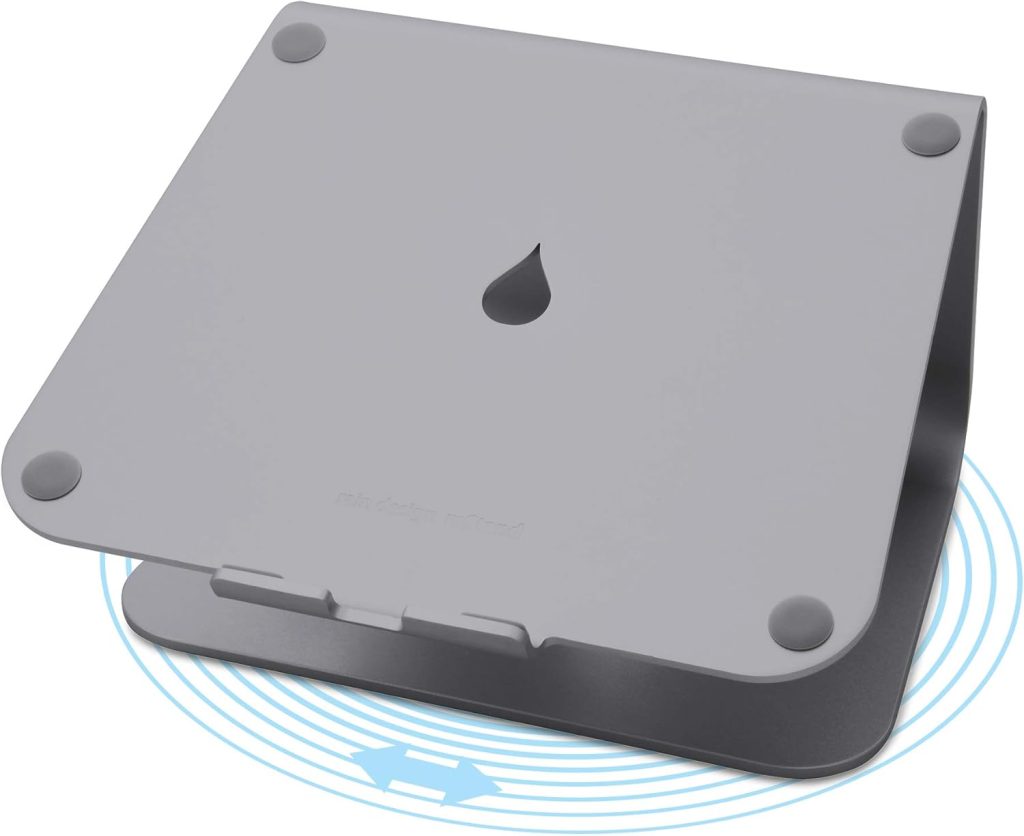
The mStand has been around for years and it’s basically the design that a lot of other stands are quietly copying. It’s a single piece of aluminum, no folding hinges, no adjustable angle, just a fixed curve that raises your laptop to about 5.9 inches and angles the screen back slightly. There’s a cutout at the back for cable routing, which is a small touch but genuinely useful if your desk setup has a lot of cords running behind the monitor.
Because it’s one solid piece of metal with no moving parts, it’s the most stable stand on this list by a good margin. I’ve never felt it flex or wobble, even typing directly on the laptop keyboard while it’s elevated. It also matches the aluminum finish of MacBooks almost exactly, so if you care about your desk looking put together, this is the one that disappears into the setup rather than looking like an accessory bolted on.
The tradeoff is obvious: no adjustability. You get one height and one angle, and if that doesn’t work for your neck or your desk height, there’s nothing to tweak. It’s also not something you’d want to carry around since it’s a solid metal piece with some actual heft to it.
Pros:
– Extremely stable, zero wobble
– Matches MacBook aluminum finish closely
– Built-in cable routing cutout
– No moving parts to wear out over time
Cons:
– Fixed height and angle only
– Not portable, meant to live on one desk
– Doesn’t fit some 17-inch or oversized laptops well
Best for: people with a dedicated home office desk who want the most stable option and don’t need to move it around.
4. Twelve South Curve Flex
Price: $79.95 — Check price on Amazon
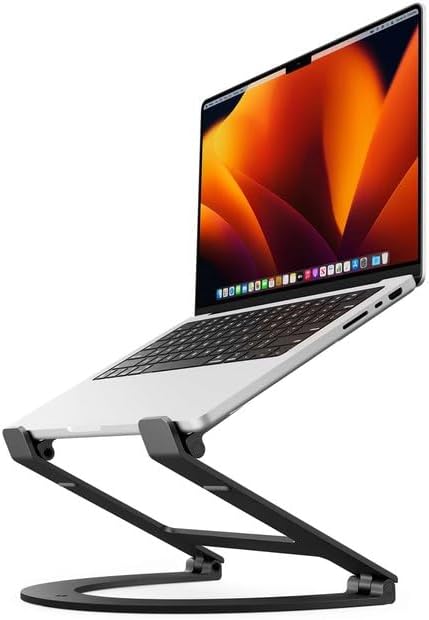
The Curve Flex is Twelve South’s answer to “what if the mStand could also adjust.” It keeps a similar single-piece aesthetic but adds a flexible joint that lets you tilt and raise the screen anywhere from about 3.5 to 11.4 inches. That range covers both a comfortable seated position and something close to a standing desk height, which is the main reason I’d point people toward this over the standard mStand if budget allows.
Build quality is what you’d expect from Twelve South, which is to say it’s solid. The base has a rubberized underside so it doesn’t slide on the desk, and the arm that holds the laptop has a padded lip that keeps things from sliding forward when you’re typing at an angle. It supports laptops up to 17 inches and handles the heavier gaming laptops and MacBook Pros without any flex I could detect.
The price is the sticking point. At $70 to $80, you’re paying almost double what the mStand costs for the added flexibility, and if you don’t actually need the adjustable height, you’re better off saving the money. But if you go back and forth between sitting and standing at your desk during the day, this is one of the few stands solid enough to trust at full height.
Pros:
– Adjustable height and angle in a solid, one-piece design
– Rubberized base that doesn’t slide around
– Handles heavier 17-inch laptops without flex
– Good middle ground between the fixed mStand and the collapsible Roost
Cons:
– Pricier than most fixed stands
– Heavier than portable options, not meant for travel
– Overkill if you only ever use one height setting
Best for: people who want adjustability and rock-solid stability at their main desk and are willing to pay for both.
5. Roost Laptop Stand V3
Price: $89.95 — Check price on Amazon
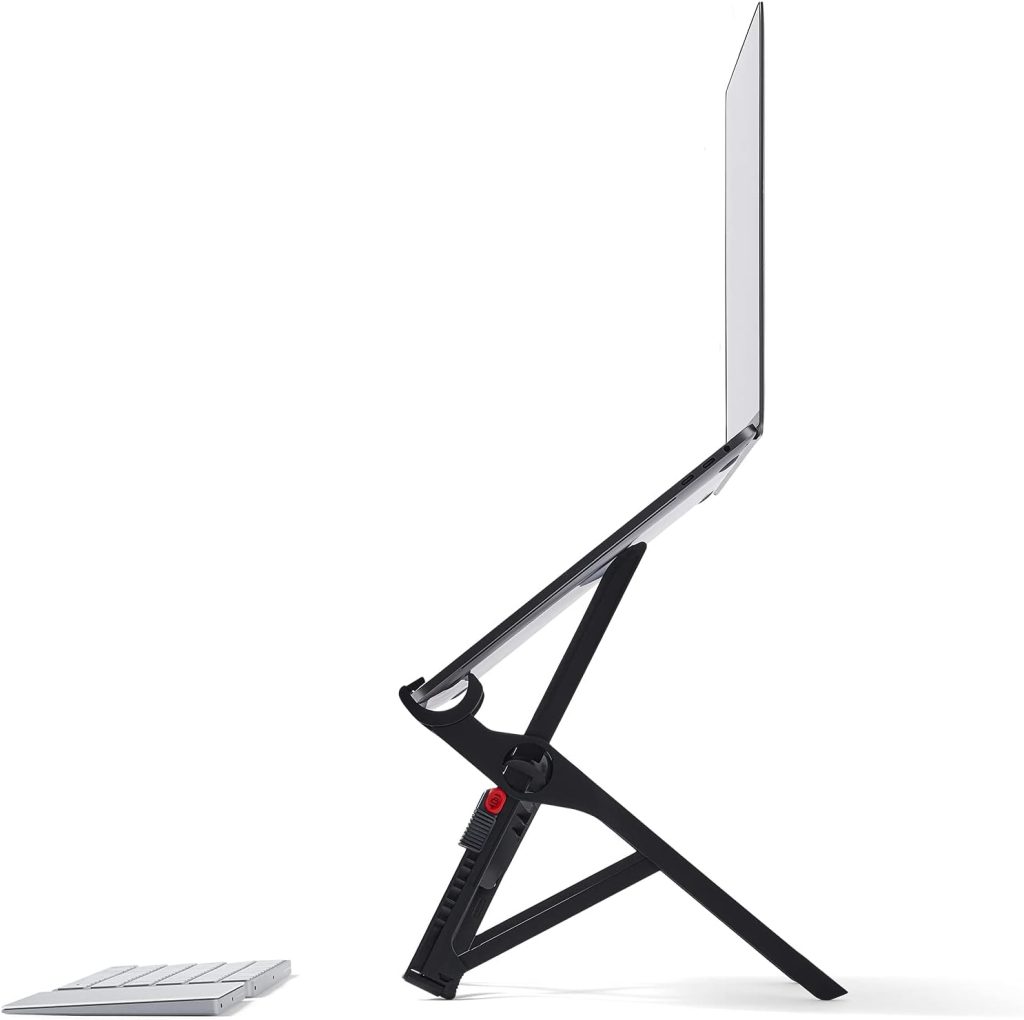
I’ll be honest, the Roost was the stand that changed my mind about how much a “just a stand” product could matter. It’s made of a lightweight aircraft-grade aluminum alloy, folds down into a shape about the size of a large pen, and weighs close to a pound. I’ve taken this thing through airports, coffee shops, and coworking spaces for two years and it still looks new.
The height range is the real selling point here. It goes from around 3 inches up to almost 14 inches, which means you can actually use it as a genuine standing desk riser, not just a slight incline. That range is rare among portable stands, most of which top out around 8 inches.
Where it falls short is stability at the very top of that height range. Fully extended, there’s a little flex if you tap the keyboard hard, though this is somewhat expected of anything this light and packable. It’s also the priciest stand on this list by a wide margin, so it only makes sense if portability is genuinely a priority for you.
Pros:
– Extremely light and packs down small
– Height range goes much higher than competitors
– Durable build that holds up to repeated travel
– Fits laptops from 11 to 17 inches
Cons:
– Expensive relative to the other options here
– Slight wobble at maximum height extension
– No cable management or accessory attachments
Best for: remote workers who travel often or move between locations and need something that fits in a bag without adding real weight.
Which one should you get
If you’re just starting to set up a home office and don’t want to spend much, get the Nulaxy. It does the job and costs less than a dinner out. If you want something a little sturdier that’ll last years at a stationary desk, the Lamicall S1 is the better value. If you’re constantly moving between locations, the Roost is worth the extra money because nothing else on this list packs down as small or as light. If you have a dedicated desk and want maximum stability with zero moving parts, get the Rain Design mStand. And if you want adjustability without sacrificing stability and don’t mind paying for it, the Twelve South Curve Flex is the one I’d point a friend toward.
My own setup right now uses the mStand at my main desk and the Nulaxy at a secondary spot in another room. That combination has worked for about two years without either one giving me trouble.
Final thoughts
A laptop stand is one of the cheapest fixes you can make to a home office setup, and it’s one that actually shows up in how your neck and shoulders feel by the end of the week. You don’t need to spend $80 to get the posture benefit. Even the $15.99 Nulaxy raises your screen enough to stop the worst of the hunching. Where the price difference matters is in stability, adjustability, and how much abuse the stand can take over years of daily use. Figure out whether you need portability or a permanent setup first, and the right pick on this list should be obvious from there.
Affiliate disclosure: This article contains affiliate links. If you click through and purchase, WorkRemote HQ may earn a commission at no extra cost to you. All opinions are based on honest research and assessment.