My wrist started aching around month four of working from home. Not dramatic pain, just a dull soreness that showed up by 3pm and stuck around through dinner. I ignored it too long, figuring that’s just what typing all day feels like. It isn’t. It’s what typing all day on a flat keyboard and a mouse shaped like a bar of soap feels like.
Remote work made this worse for a lot of people. In an office you get up for meetings or walk to a printer. At home, many of us are locked into one chair, one desk, one keyboard angle, all day. Standard keyboards force wrists to bend inward toward each other. Standard mice twist the forearm into a palm-down grip for hours. Neither position is natural, and your body lets you know eventually, tingling fingers, a sore wrist, an ache that creeps into the forearm.
I spent a few weeks researching and testing what’s actually available and well-reviewed on Amazon. Here’s where I landed.
Quick verdict
If you want the safest, cheapest upgrade, get the Logitech Ergo K860 paired with the Logitech MX Vertical mouse. On a tight budget, the Nulea Wireless Ergonomic Keyboard is shockingly good for the price. For the best mechanical feel in a split layout, go with the Keychron Q8 Pro. And if the MX Vertical feels like too much mouse, the Logitech Lift gets you most of the benefit for less.
What to look for in ergonomic input devices
Wrist angle. The whole point. A good ergonomic keyboard tents upward or splits apart so hands sit at a natural angle instead of flat and rotated inward. A good ergonomic mouse lets your hand rest in a handshake position, thumb up, rather than palm-down.
Split vs standard. Split keyboards separate the halves, either fixed at an angle (Logitech Ergo K860) or fully independent (Nulea, ZSA Moonlander, Kinesis Advantage360). Fixed-split is the easier transition. Fully split takes longer to adjust to but lets you position each half exactly where your shoulders want it, useful if you’re broad-shouldered or your desk is tight.
Wireless vs wired. Wireless is nice for cable management, but check the connection type. Bluetooth works fine for most people, though a dedicated USB receiver tends to be more reliable with less lag. Wired is still the safest bet for latency-sensitive work.
Key travel and switch type. Membrane keyboards have short, mushy travel. Mechanical keyboards use individual switches, and travel and resistance vary by type. Longer travel isn’t automatically better, what matters is you’re not bottoming out hard on every keystroke. A mechanical board with a lighter switch usually feels less punishing over a full day.
The 5 best ergonomic keyboards and mice
1. Logitech MX Vertical wireless mouse
Price: $57.99 — Check price on Amazon
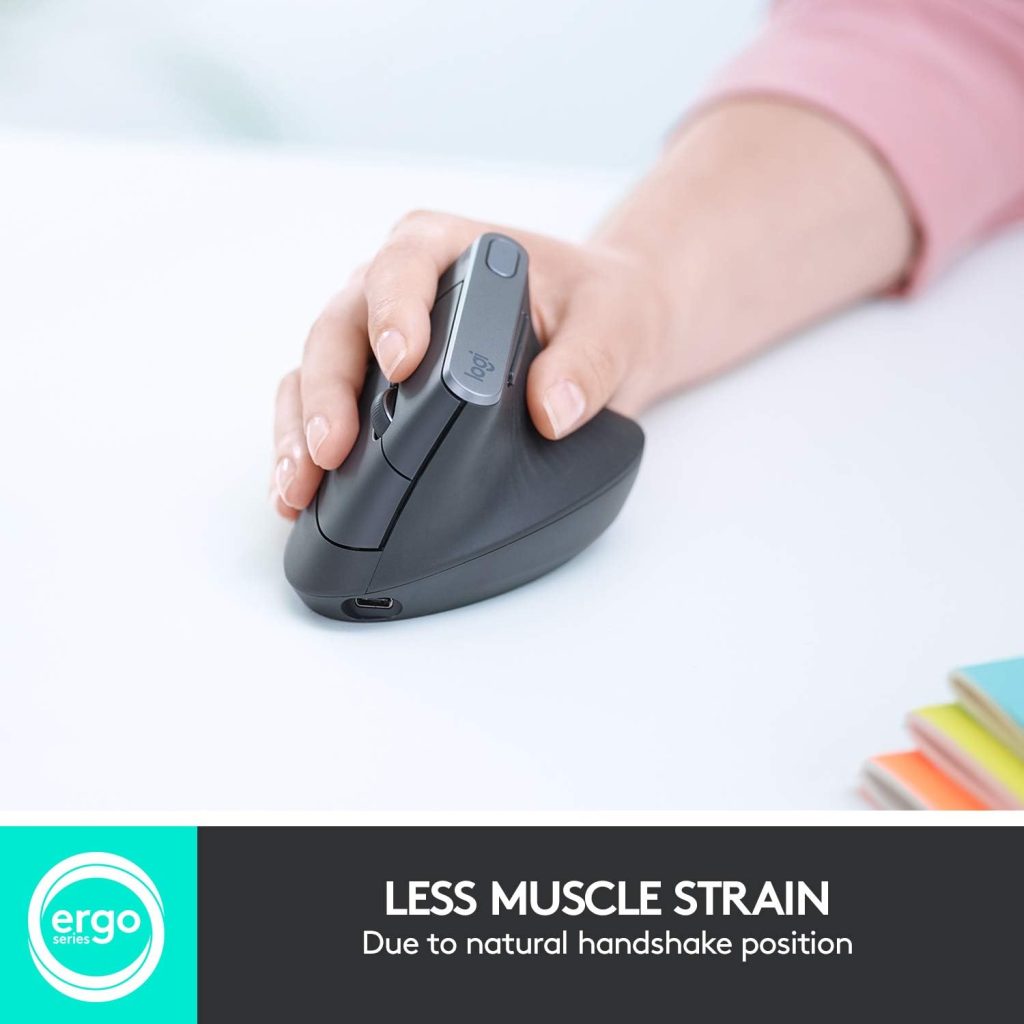
Pairing a good ergonomic keyboard with a flat mouse only does half the job, and the MX Vertical is the mouse I’d pair with anything here. It sits at a 57-degree angle, putting your hand in a handshake position instead of the flat, twisted grip a normal mouse forces on your forearm.
The adjustment period is real. Accuracy will probably be worse the first week because your brain has to relearn where the cursor goes relative to your hand angle. Stick with it. After about ten days mine felt normal, and going back to a flat mouse now feels genuinely uncomfortable. Not cheap for “just a mouse,” but build quality backs up the price. Good scroll wheel weight, programmable side buttons, and battery life long enough that I charge it roughly once a month. If you only fix one thing here, make it the mouse, since your mouse hand stays twisted far longer during a typical workday.
Pros:
– 57-degree angle meaningfully reduces forearm strain
– Long battery life, quick charge via USB-C
– Programmable buttons through Logitech Options+
– Works with both Bluetooth and USB receiver
Cons:
– Adjustment period hurts your accuracy for the first week or so
– Larger size may not suit smaller hands well
– Right-hand only, no left-handed version available
Best for: people whose wrist pain is mostly mouse-hand related rather than typing related.
2. Nulea Wireless Ergonomic Keyboard
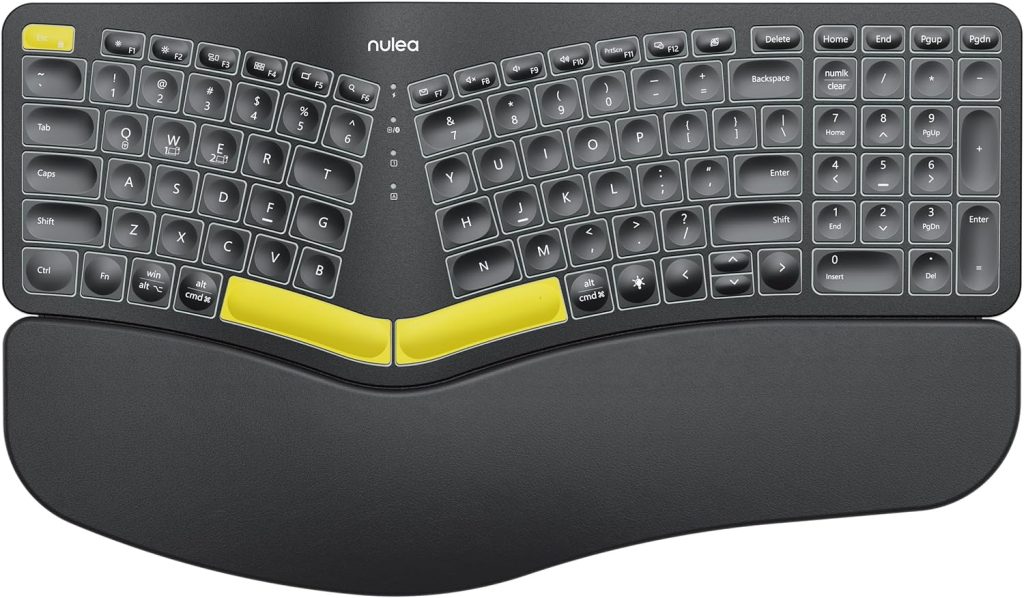
Price: $64.99 — Check price on Amazon
This is the one I recommend to anyone who says “I don’t want to spend a lot but my wrists hurt.” Microsoft’s own ergonomic keyboards have crept up toward $300 in recent years, which puts them out of reach for a budget pick. The Nulea steps into that gap with a true split keyboard, wireless connectivity, and a padded wrist rest, at a fraction of the price. It splits fully in two, so you can angle each half wherever your shoulders want it, and it includes a 7-color backlight for typing in dim rooms.
Typing feel is membrane, not mechanical, but for the price the split layout does more for your wrists than the switches ever could. It connects over Bluetooth or USB-C wired, and charges over USB-C instead of relying on disposable batteries. It won’t feel as premium as the Logitech boards further down this list, but as a first ergonomic keyboard to test whether the split layout works for you, it’s a low-risk way to find out.
Pros:
– Genuinely split keyboard at a fraction of premium ergonomic keyboard prices
– Fully adjustable split angle, not fixed like one-piece designs
– USB-C rechargeable instead of disposable batteries
– Backlit keys for typing in low light
Cons:
– Membrane switches feel mushy if you’re used to mechanical
– Build quality is plastic, not as premium as Logitech’s offerings
– Bluetooth pairing can be finicky on first setup
Best for: anyone testing the waters with a fully split keyboard before spending real money.
3. Logitech Lift vertical ergonomic mouse
Price: $71.24 — Check price on Amazon
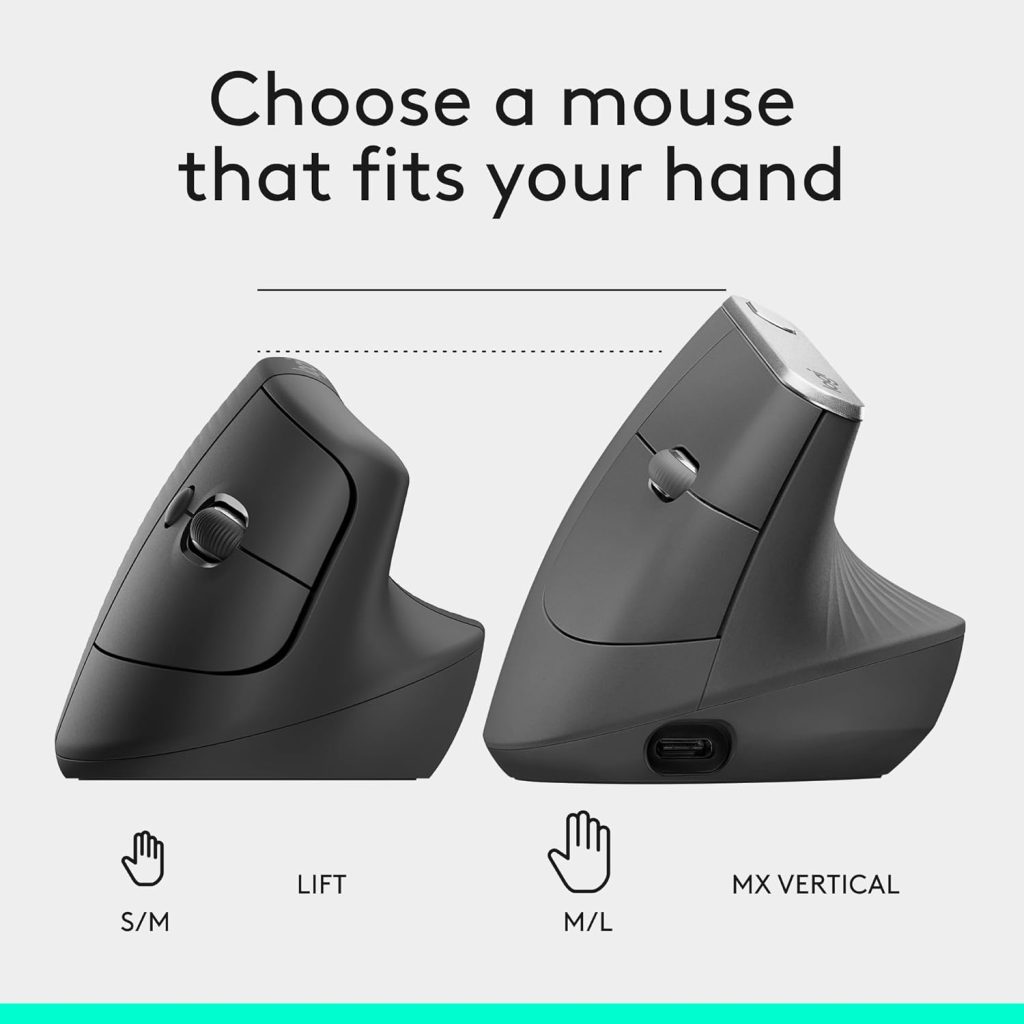
If the MX Vertical above is more mouse than you want to spend on, the Logitech Lift gets you most of the same benefit in a smaller, cheaper package. It sits at a 57-degree angle just like the MX Vertical, putting your hand in a natural handshake grip, but the body is noticeably more compact, which matters if you’ve got smaller hands or found the MX Vertical too bulky.
I switched a coworker over to this one after she complained the MX Vertical felt like gripping a baseball. The Lift felt right to her within a couple of days, no real adjustment period compared to the week it took me to get used to the bigger mouse. It’s not quite as premium feeling, the scroll wheel has a bit less resistance and the buttons feel slightly less substantial, but for the price difference that’s a fair trade.
Battery life is solid, rated at around two years on a single AA battery rather than a rechargeable pack, which is either a pro or a con depending on whether you’d rather never think about charging or never buy a battery.
Pros:
– Same 57-degree ergonomic angle as pricier options
– Smaller body suits smaller hands better
– Long battery life on a single replaceable AA battery
– Available in a left-handed version, unlike some competitors
Cons:
– Scroll wheel and buttons feel less premium than costlier mice
– Uses a replaceable battery instead of rechargeable
– Smaller size may feel cramped for larger hands
Best for: anyone who wants the ergonomic benefit of a vertical mouse without the MX Vertical’s size or price.
4. Keychron Q8 Pro QMK mechanical split keyboard
Price: $89.99 — Check price on Amazon
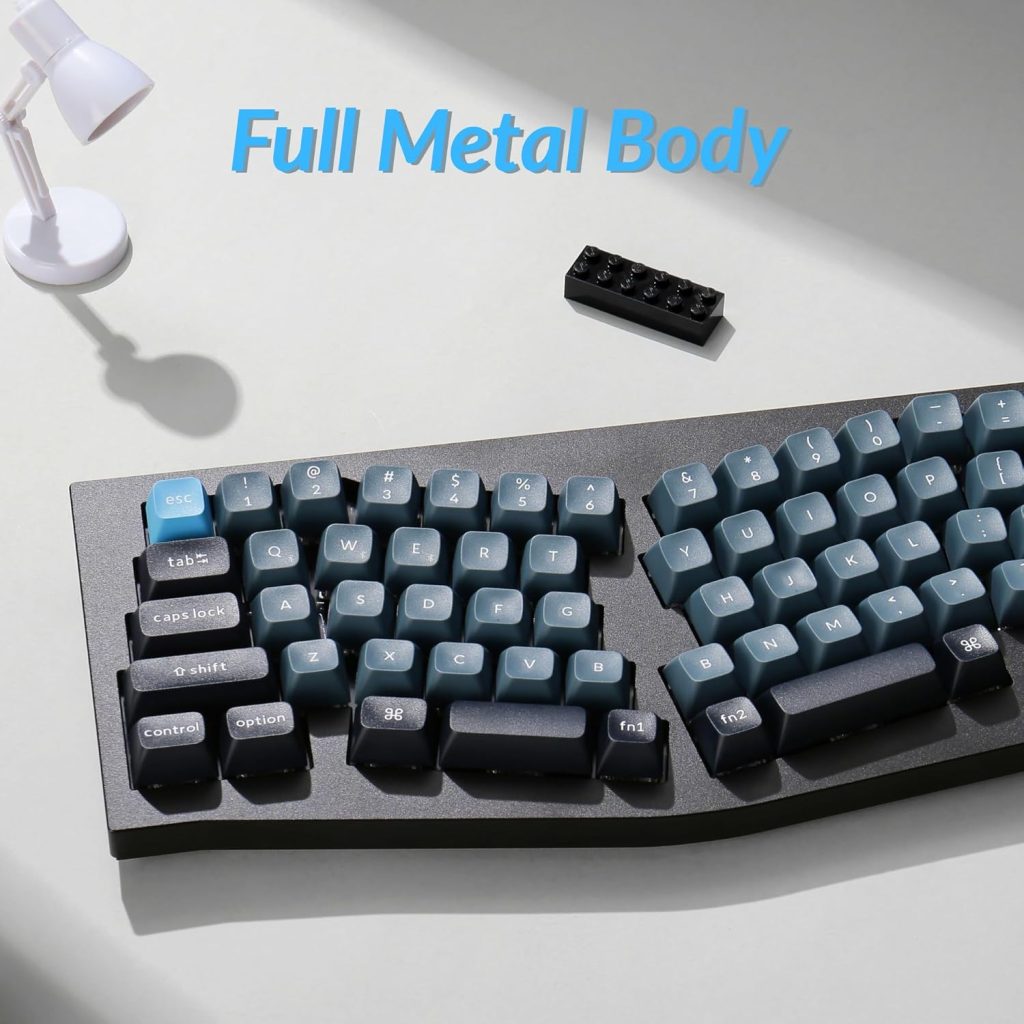
If the boards above feel too soft and you like the sound and resistance of mechanical switches, the Keychron split lineup is where I’d point you. The Q8 Pro uses hot-swappable switches, so you can swap in something lighter or heavier without soldering, and it comes fully assembled with KSA double-shot PBT keycaps and pre-lubricated switches, not a barebone kit you have to build yourself.
The split design is a fixed 65% Alice layout rather than fully independent, an easier adjustment than a fully split board, but still gives your shoulders more room than a one-piece keyboard. Aluminum-bodied and heavy, it won’t move on your desk no matter how hard you type. QMK and VIA support means every key is remappable, and unlike the standard Q8, the Pro adds Bluetooth wireless with up to 300 hours of battery life, so you’re not tied to a cable.
Pros:
– Hot-swappable switches let you customize typing feel over time
– Comes fully assembled with keycaps and switches installed
– Full remapping through QMK/VIA software
– Bluetooth wireless with up to 300 hours of battery life
Cons:
– Pricier than the membrane keyboards on this list
– Aluminum build is heavier and less portable
– Learning curve for VIA software if you want to remap keys
Best for: mechanical keyboard enthusiasts who don’t want to give up tactile feel to get ergonomic benefits.
5. Logitech Ergo K860 keyboard
Price: $149.99 — Check price on Amazon
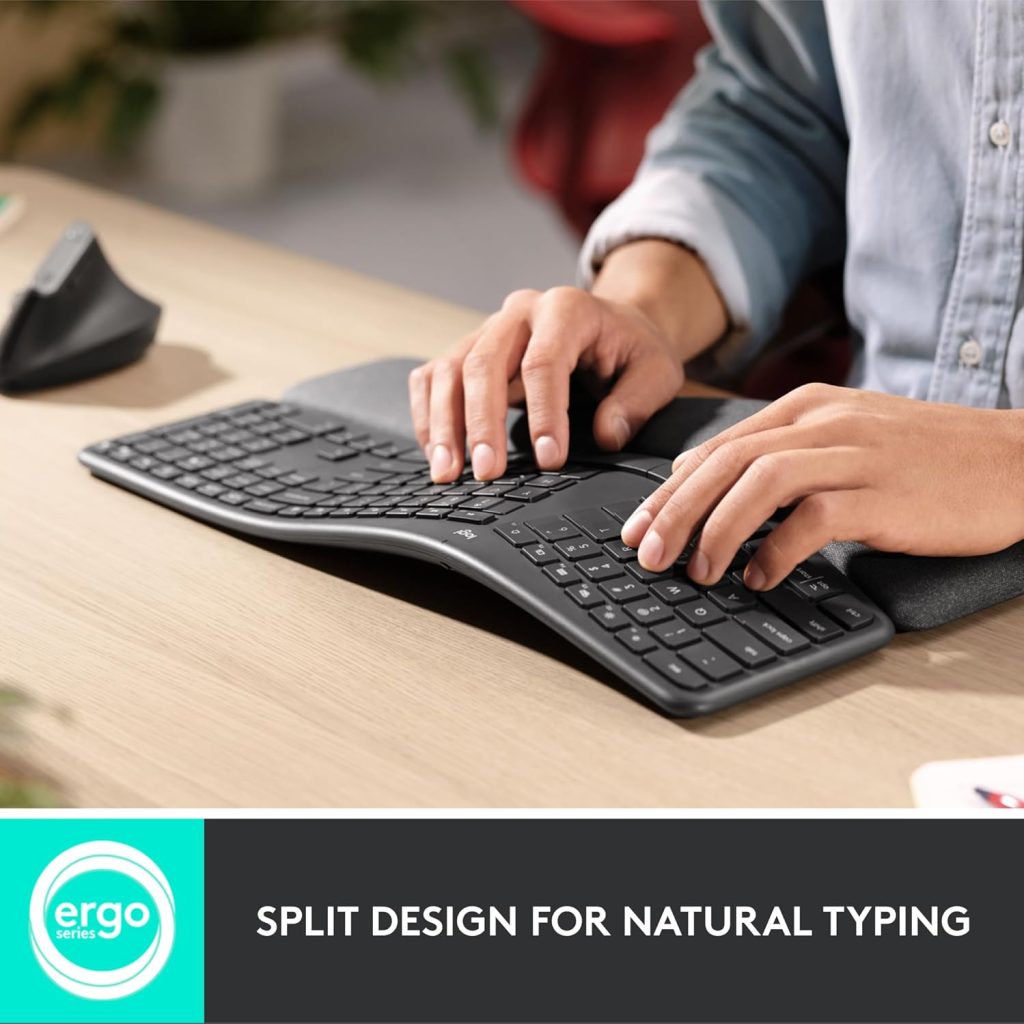
The K860 is the keyboard I’d tell most remote workers to buy without overthinking it. Pronounced dome shape, a negative tilt option (the back tilts down instead of up, keeping wrists straighter than almost any flat keyboard), and a padded palm rest dense enough to actually support your wrist.
Typing on it takes three or four days to feel normal coming from a flat keyboard, since key spacing is wider because of the curve. Once it clicks, it’s hard to go back. I’ve used mine over a year and my end-of-day soreness disappeared within the first two weeks. Battery life is excellent, charged maybe once every two months, connecting via Bluetooth or Logi Bolt receiver, both reliable. It’s not mechanical, so if you want tactile click, look elsewhere on this list.
Pros:
– Negative tilt design keeps wrists flatter than almost any competitor
– Excellent battery life, connects via Bluetooth or Logi Bolt
– Solid build quality that doesn’t flex or creak
– Works well for both PC and Mac out of the box
Cons:
– Membrane switches, not mechanical, so typing feel is soft
– Takes a few days of adjustment for muscle memory
– No backlighting, which matters if you type in low light
Best for: remote workers who want the biggest wrist-angle improvement without learning a fully split layout.
Which one should you get
If you’ve never used an ergonomic keyboard and just want your wrists to stop hurting by Friday, start with the Nulea Wireless Ergonomic Keyboard. It’s cheap enough that trying it isn’t a real financial decision.
If you’re committing to remote work long-term, the Logitech K860 and MX Vertical combo is the pairing I’d buy again if mine broke tomorrow. Best balance of comfort, reliability, and price here.
If you like mechanical keyboards, get the Keychron Q8 Pro. And if the MX Vertical feels like too much mouse or too much money, the Logitech Lift gets you most of the ergonomic benefit in a smaller package.
Final thoughts
None of this gear fixes bad posture, a chair that’s too low, or a desk that’s the wrong height. It helps with one piece of the puzzle: the angle your hands and wrists sit at for hours every day. That matters more than people give it credit for, but it’s not the whole picture.
I waited almost a year before fixing my setup, assuming the soreness was normal. It wasn’t, and it went away almost completely once I changed my keyboard and mouse. If your wrists ache by the end of the day, that’s not something to push through. It’s a sign your gear doesn’t match how your body works, and for less than the cost of a nice dinner out, most of that is fixable.
Affiliate disclosure: This article contains affiliate links. If you click through and purchase, WorkRemote HQ may earn a commission at no extra cost to you. All opinions are based on honest research and assessment.