I switched from Notion to Obsidian in 2022, switched back to Notion six months later, then ended up using both at the same time for about a year before finally committing. So when people ask me about Notion vs Obsidian, I have a lot of opinions. Probably too many.
This article is for freelancers trying to figure out where to build their second brain – not just which app looks cooler in a YouTube thumbnail.
What a “second brain” actually means
If you haven’t heard the term before: a second brain is a personal knowledge system where you store notes, ideas, project information, research, and anything else your actual brain shouldn’t have to hold onto. The idea was popularized by Tiago Forte, and the basic premise is that your head is for thinking, not storing. You offload the storage to a trusted external system.
For freelancers, this matters more than most people realize. You’re juggling clients, deadlines, invoices, research, ideas for pitches, half-finished articles, meeting notes, and about forty browser tabs you keep telling yourself you’ll read later. A good second brain brings all of that into one place you can actually search and navigate.
Setup experience
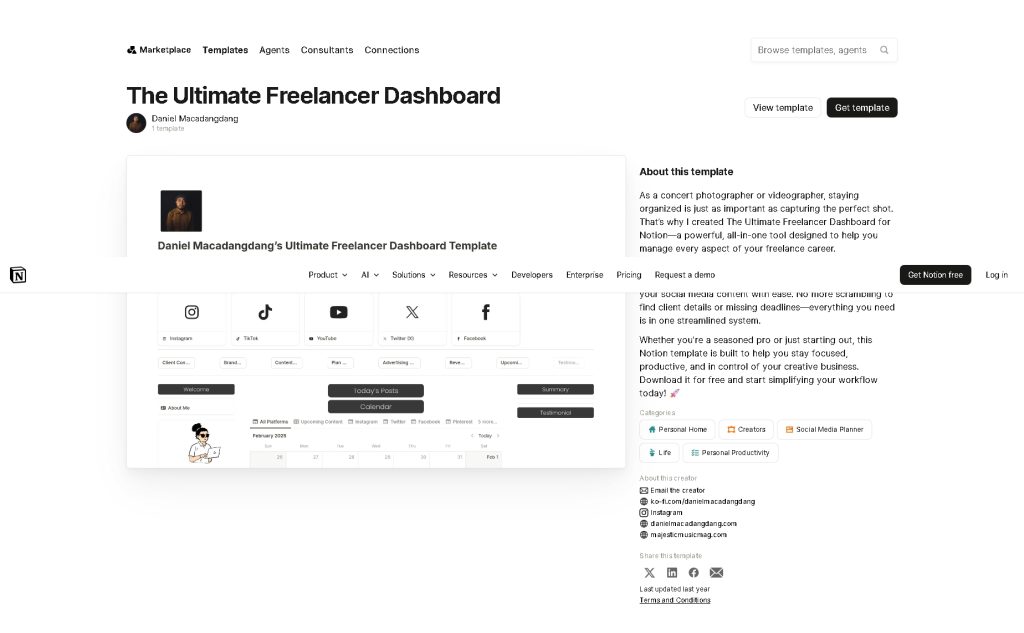
Notion wins this one, and it’s not close.
You sign up, pick a template (or don’t), and you’re writing notes within two minutes. The interface is clean, the blocks are intuitive, and you don’t need to read any documentation to get started. For someone who just wants to capture information quickly, that matters.
Obsidian is different. It’s a local app that stores everything as plain Markdown files on your device. Before you do anything useful, you’re creating a vault, choosing a folder location, figuring out what a vault even is, and probably watching a 45-minute YouTube video from someone who has color-coded their entire life. Then you discover plugins. Then you lose three hours setting up a system that is, technically, exactly the way you want it – but you haven’t written a single actual note yet.
That’s a real time cost that Notion doesn’t ask you to pay upfront.
Note-taking day to day
Notion’s block-based editor is genuinely pleasant to use. You can mix text, images, checkboxes, tables, callouts, and embedded files in a single page. For client project pages, it’s hard to beat – everything lives in one structured document, and you can share it externally with a client in about fifteen seconds.
Obsidian’s editor is Markdown, which either feels like home or feels like you’re writing a README file for a project nobody asked for. Once you get comfortable with it, writing is fast. There’s no formatting toolbar getting in your way. But if you want something polished enough to share with a client, Obsidian is not that app.
One thing Obsidian does better for pure note-taking: your notes are just text files on your computer. Open them in any other app, back them up anywhere, never worry about a company shutting down and taking your data with it.
Linking ideas and building connections
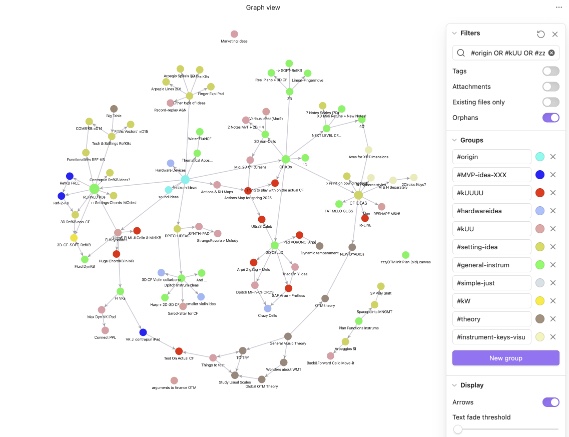
This is Obsidian’s strongest argument, and it’s a real one.
Obsidian has a graph view that shows how your notes connect to each other. You type [[ and link any note to any other note. Over time, patterns show up. A client note links to a research note links to a half-finished article idea. You start seeing relationships between things that felt separate when you wrote them.
Notion has internal linking too, but the graph visualization isn’t there, and the databases are more structured than connected. It’s a different mental model.
If you work in a field where ideas compound on each other – research, writing, strategy, consulting – Obsidian’s linking approach is genuinely different from anything else. The term “second brain for freelancers” gets thrown around a lot, but Obsidian is the app that actually builds something that feels like one.
Pricing
Obsidian is free for personal use. The paid plan (Obsidian Sync) costs $8/month if you want seamless syncing across devices instead of manually handling it through Dropbox or iCloud. Most freelancers never need the paid tier.
Notion has a free tier that covers most personal use cases. Paid plans start at $12/month billed monthly. For a solo freelancer, the free tier is usually enough.
Neither app is expensive. But if price is a factor, Obsidian is the clear choice – you can run the full experience for nothing.
Offline access
Obsidian wins this without any competition. Your notes are on your hard drive. No internet required, no syncing lag, no waiting for a page to load on slow hotel WiFi.
Notion requires an internet connection to function properly. There’s limited offline access on mobile, but it’s unreliable and often frustrating. If you travel frequently, work from coffee shops with spotty internet, or have ever needed a note on a flight and couldn’t get to it – this is a real limitation.
Learning curve
Notion’s learning curve is a gentle slope. Obsidian’s is a cliff with a beautiful view at the top.
That’s not an insult to Obsidian. The plugin ecosystem is enormous, the community has built templates for every possible workflow, and once you understand the system, it does things no other app can do. But you will invest real time before it pays off.
Notion rewards you immediately. Obsidian rewards you eventually.
Comparison table
| Feature | Notion | Obsidian |
|---|---|---|
| Setup time | Minutes | Hours to days |
| Interface | Visual, block-based | Markdown text editor |
| Offline access | Limited | Full (local files) |
| Idea linking / graph view | Basic internal links | Full graph with backlinks |
| Client sharing | Built-in, easy | Not designed for sharing |
| Free tier | Yes (generous) | Yes (very generous) |
| Paid plan starting price | $12/month | $8/month (Sync only) |
| Templates | Hundreds built-in | Community-built |
| Mobile app | Strong | Functional |
| Best for | Project management + notes | Pure knowledge building |
Who should use which
Use Notion if you want one place to manage clients, projects, tasks, and notes together. It handles structured information well, the free tier is genuinely useful, and the learning curve won’t eat your week. It’s also the better choice if you need to share documents with clients or collaborate with anyone else.
(If you’re also deciding between Notion and ClickUp for task management specifically, WorkRemote HQ has a separate article comparing those two that’s worth reading before you commit to either.)
Use Obsidian if you do knowledge-heavy work – research, writing, consulting, anything where ideas build on each other over months and years. It’s also the right choice if you want total data ownership and offline reliability. Obsidian for freelancers makes the most sense when your work product is ideas, not deliverables that need to be shared.
My recommendation
Notion is the better starting point for most freelancers. It’s faster to set up, easier to maintain, handles both notes and light project management, and the free tier covers most solo freelancers completely. If you’re looking for the best note-taking app for freelancers who also want client management and simple task lists in the same place, Notion does that job well.
But I use Obsidian as my actual thinking tool. Long-form notes, research, article ideas, things I want to remember and connect over time – that lives in Obsidian. The graph view has shown me connections I genuinely would not have noticed otherwise. For building a real second brain for freelancers who do a lot of thinking and research, Obsidian is harder to beat once you’ve put in the setup time.
If you have the patience, run both. Notion for structure and client-facing work, Obsidian for your personal knowledge base. If that sounds like too much, just use Notion and don’t look back.
Affiliate disclosure: Some links on WorkRemote HQ are affiliate links. If you sign up for a tool through one of our links, we may earn a small commission at no extra cost to you. We only write about tools we’ve actually used.